
Have you ever understood something while reading about it, yet struggled to picture how it works in practice? Sometimes changing a setting or moving a part makes a long explanation much clearer.
That idea led us to create a Simulators section at Luce. The first two experiences explore how a camera works and the relationship between torque and equilibrium. You can open both in your browser and experiment.
Machines: explore how a photograph is made
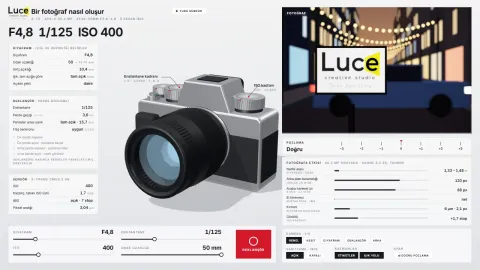
The camera simulator lets you change aperture, shutter speed, ISO and focal length. You can inspect a three-dimensional camera while watching how the settings affect a sample image.
How does opening or closing the aperture change the background? Why does a moving object leave a trail with a slow shutter? What happens when you increase ISO? Comparing settings in the same scene gives these questions a visual answer.
A cutaway view also lets you look at the components inside the camera. Watch the automatic tour first, then take over using the controls.
Education: make torque, equilibrium and pulleys visible
The second simulator is for people who want to study physics visually. If torque and equilibrium are difficult to picture, changing the same setup can be a useful way to work through them. The Turkish version also supports students preparing for the YKS/AYT exams.
There are three experiments:
- Beam balance: Change masses and the support position to explore weight and lever arm.
- Support forces: Watch how the load carried by each support changes as a weight moves along a beam.
- Pulleys: Compare pulling force and rope travel with fixed pulleys, movable pulleys and pulley systems.
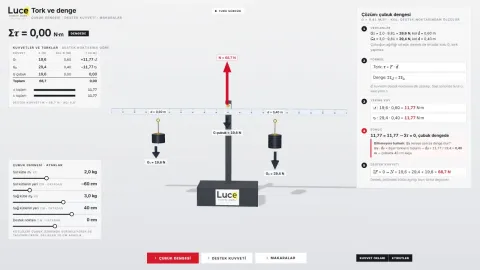
The solution panel updates with the values. Below the simulator, you will find formulas, worked examples and short exercises. Predict the result, calculate it yourself, then compare it with the solution.
Open the torque, equilibrium and pulley simulator →
Where should you start?
Start with the automatic tour in either application. Then change one variable at a time. Changing only shutter speed in the camera, or only a mass’s distance from the support in the torque experiment, makes cause and effect easier to distinguish.
The simulations are educational visualisations. They do not represent every behaviour of a real device or every condition in a physical experiment. On a phone, landscape orientation and full-screen mode make the controls easier to read.
More experiences in Education and Machines
Luce’s simulators are grouped under Education and Machines. New experiences will be accessible from the same hub as they are added.
My introduction to Luce Creative Studio covers the other areas of work. To discuss a simulator for your needs, contact Luce.